
Dynamic Player Configuration
In the previous example of key generation and signing, the subset of MPC players simply consisted of integers identifying each MPC player, like this:
// Include MPC players with index 0, 2, and 3 in the MPC session.
players := []int{0, 2, 3}
This is possible because we assume that the MPC players are all pre-configured with information about how to communicate with these nodes. In particular, that the public keys used to secure the communication with these MPC players can be read from the configuration file.
This makes sense if the Builder Vault instance consists of a number of static MPC players. We say that a remote MPC player is statically configured at another player, if the other player only obtains the remote player index, and looks up the actual information, such as URL and public key, from its configuration.
Sometimes, however, we wish to run an MPC session in a more dynamic way, where the public key of a remote player is not statically configured, but instead provided on-the-fly, when the MPC session is about to take place.
We can modify the example above, to let Player 2 be dynamically configured, by providing the public key for Player 2 in the SessionConfig object used for the MPC session:
context := context.Background()
players := []int{1,2}
player2PublicKey := []byte{0x00, 0x00, ...}
dynamicPublicKeys := map[int][]byte{
  2: player2PublicKey,
}
dynamicAddresses := map[int]string {
  2: "tcp://127.0.0.1:9000",
}
sessionConfig := tsm.NewSessionConfig(sessionID, players, dynamicPublicKeys, dynamicAddresses)
curveName := ec.Secp256k1.Name()
keyID, err := client.ECDSA().GenerateKey(context, sessionConfig, threshold, curveName, "")
Player 2 must have an MPC node running at tcp://127.0.0.1:9000 and the provided public key, player2PublicKey in this example, must match the private key in the configuration file of the MPC node of Player 2.
The MPC players do not have to agree on whether a certain player is statically or dynamically configured. Some players may refer to a remote player by a player index, and keep its public key in the configuration, while other players provide the same key dynamically. The MPC session will start, as long as all players agree on the provided public keys of each player, whether these were obtained from static configuration or provided dynamically.
If an MPC node has the public key for another MPC node configured statically in its configuration file, and it receives a request for an MPC session in which the same node is also dynamically configured, the MPC node will choose the public key from its static configuration and ignore the dynamic public key.
Dynamic Addresses
For certain types of MPC communication you must also specify an address for connecting to a dynamic player. An address can be a URL, but there are also two other addresses with a special meaning:
- "incoming://": Means that you use a direct connection with this player, but you wait for this player to connect to you.
- "broker://": Means that you communicate with this player via a message broker.
If the MPC node is configured to use only one type of communication, you do not need to specify any of these special addresses.
Use Case: MPC Player Multi-Tenancy
Dynamic player configuration is useful for implementing MPC player multi-tenancy. Consider, for example, the case with a wallet provider and a number of wallet users, where each user’s key should be secret shared between the user’s mobile device and the wallet provider, in order to obtain “split” custody.
This can be achieved with Builder Vault and dynamic player configuration, as in the following picture:
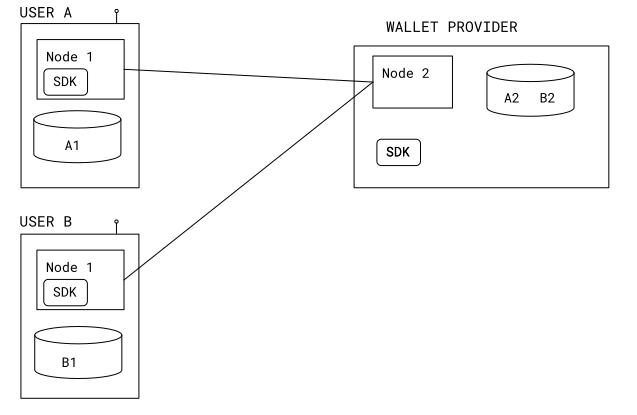
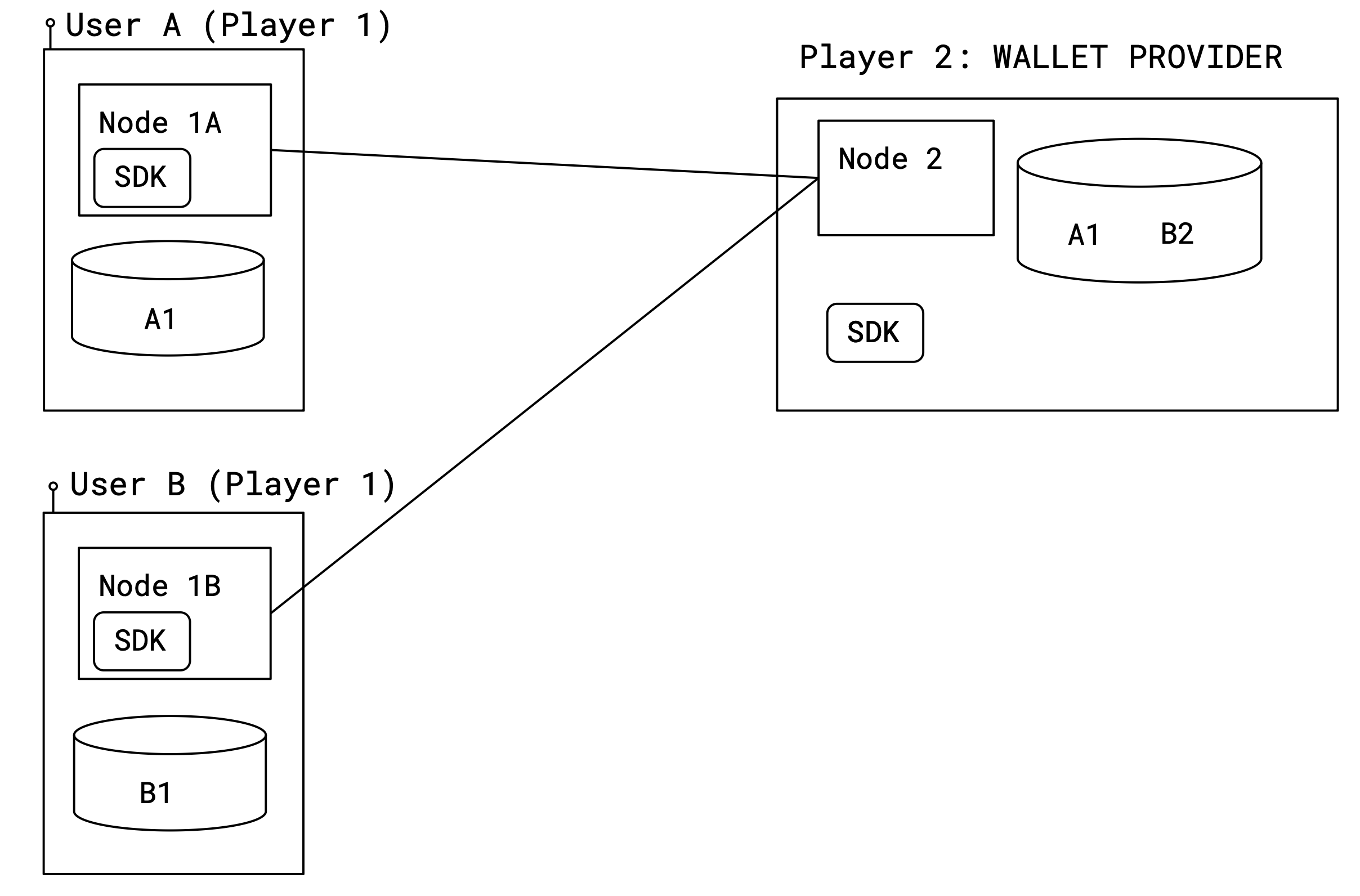
The setup consists of a single Builder Vault instance with two MPC players, Player 1 and Player 2.
The user is Player 1. He is running one MPC node together with the SDK embedded in a library on his mobile device.
The wallet provider is Player 2. He runs a single MPC node on a server.
There are many users, and for each mobile user device, there is one Player 1 MPC node running.
In the picture above, there are two keys: Key A, secret shared using key shares a1 and a2; and Key B secret shared as b1, b2. Note that Node 2 holds one share of each key in its database (a2 and b2), while each instance of Node 1 only holds a share of the key belonging to the user.
To generate a signature using the key of User A, the wallet provider and User A’s mobile device first need to agree on the message to sign, and a session ID. To generate the signature, the wallet provider also needs to fetch the public key used for communicating securely with the instance of Node 1 that is running on User A’s mobile device. Then, to start the MPC signing session, Sign must be called on both the SDK on the Node 1 instance on User A’s mobile, and the SDK of Node 2. When calling Sign on the SDK controlling Node 2, the public key of User A must be dynamically provided.
The number of mobile devices running a Player 1 MPC node can be scaled up and down, dynamically, depending on the number of users. The wallet provider just needs to maintain a mapping of users to the public keys used for communicating with the MPC node instance running on the user’s device. When running an MPC session with a particular user, the wallet provider must dynamically provide this key to the SDK.
The MPC node multi-tenancy described here should not be confused with the kind of multi-tenancy that can be obtained by having different SDKs log into the TSM using different API keys.
Code Example
The following is a full example with three MPC nodes, that you can run locally using Docker or Kubernetes.
See our Local Deployment tutorial for more information about running a Builder Vault instance with the MPC nodes running in Docker containers on your local machine.
The two nodes Node 1 and Node 2 are statically configured, while Node 0 is dynamically configured. The configuration files only contain public keys for the two static nodes:
[Player]
	  Index = 0
	  PrivateKey = "MHcCAQEEICgtHkgYOBW0cKUWaJxXN5fQeOUcJOPSzdan0GBHJcAloAoGCCqGSM49AwEHoUQDQgAE0OqvUD8ezIIHktmgrDIRh7bwQ3k9G8HZochWXovvQjCm4wQiJBHunl82I9pbeVLD9fa/40Fv8/NRcYiGh/cyUw=="

[Players.1]
	  Address = "tsm-node1:9001?connectionPoolSize=6&connectionLifetime=5m"
	  PublicKey = "MFkwEwYHKoZIzj0CAQYIKoZIzj0DAQcDQgAEzsWqmbQ6uG/G7iqAZQXxoReQk0WE6hGw+I8UMyB3Y6jnoEcyefzKklCCEupMWrsV1l79XBRQrvJTxlqMOQ5ahQ=="

[Players.2]
	  Address = "tsm-node2:9002?connectionPoolSize=6&connectionLifetime=5m"
	  PublicKey = "MFkwEwYHKoZIzj0CAQYIKoZIzj0DAQcDQgAE/t4PfL0KQQAWpZ1q6CikFXw0GeY3lgTUDt8HPT0Bw3kCJ44jIp8QUYZNCNIO/ofZPNwkKi8i1hffK5wheWbJWA=="

[Database]
	  DriverName = "sqlite3"
	  DataSourceName = "/tmp/tsm_node_0.sqlite"
	  EncryptorMasterPassword = "Q3DTN6BVn2OBhmdzG9KXOci5OIgTQObZh23e3D044f6IN2StBDgBP49jJ0X8NPGN"

[SDKServer]
    Port = 8000

[[Authentication.APIKeys]]
    APIKey = "IntV2sEZRwwd2F+UkDLC7zmFhwvpxAwb0eQKwdEnSZU="  # apikey0
    ApplicationID = "demoapp"

[DKLS23.Features]
    GenerateKey = true
    GeneratePresignatures = true
    Sign = true
    SignWithPresignature = true
    GenerateRecoveryData = true
    PublicKey = true
    ChainCode = true
    Reshare = true
    CopyKey = true
    ExportKeyShare = true
    ImportKeyShare = true
    ExportKey = true
    ImportKey = true
[Player]
    Index = 1
    PrivateKey = "MHcCAQEEIKDf8q1LEUHKADBmq4mTxo7t3gLvgfE6gd26g5qO2cProAoGCCqGSM49AwEHoUQDQgAEzsWqmbQ6uG/G7iqAZQXxoReQk0WE6hGw+I8UMyB3Y6jnoEcyefzKklCCEupMWrsV1l79XBRQrvJTxlqMOQ5ahQ=="

[Players.2]
    Address = "tsm-node2:9002?connectionPoolSize=6&connectionLifetime=5m"
    PublicKey = "MFkwEwYHKoZIzj0CAQYIKoZIzj0DAQcDQgAE/t4PfL0KQQAWpZ1q6CikFXw0GeY3lgTUDt8HPT0Bw3kCJ44jIp8QUYZNCNIO/ofZPNwkKi8i1hffK5wheWbJWA=="

[Database]
    DriverName = "sqlite3"
    DataSourceName = "/tmp/tsm_node_1.sqlite"
    EncryptorMasterPassword = "encryptorMasterPassword1"

[MPCDirectServer]
    Port = 9001

[SDKServer]
    Port = 8001

[[Authentication.APIKeys]]
    APIKey = "1PebMT+BBvWvEIrZb/UWIi2/1aCrUvQwjksa0ddA3mA=" # apikey1
    ApplicationID = "demoapp"

[DKLS23.Features]
    GenerateKey = true
    GeneratePresignatures = true
    Sign = true
    SignWithPresignature = true
    GenerateRecoveryData = true
    PublicKey = true
    ChainCode = true
    Reshare = true
    CopyKey = true
    ExportKeyShare = true
    ImportKeyShare = true
    ExportKey = true
    ImportKey = true
[Player]
    Index = 2
    PrivateKey = "MHcCAQEEIHEzQUbLNHT3dKMG1KGfEvmhXdRflS/awKMy0jlZ2I01oAoGCCqGSM49AwEHoUQDQgAE/t4PfL0KQQAWpZ1q6CikFXw0GeY3lgTUDt8HPT0Bw3kCJ44jIp8QUYZNCNIO/ofZPNwkKi8i1hffK5wheWbJWA=="

[Players.1]
    Address = "tsm-node1:9001?connectionPoolSize=6&connectionLifetime=5m"
    PublicKey = "MFkwEwYHKoZIzj0CAQYIKoZIzj0DAQcDQgAEzsWqmbQ6uG/G7iqAZQXxoReQk0WE6hGw+I8UMyB3Y6jnoEcyefzKklCCEupMWrsV1l79XBRQrvJTxlqMOQ5ahQ=="

[Database]
    DriverName = "sqlite3"
    DataSourceName = "/tmp/tsm_node_2.sqlite"
    EncryptorMasterPassword = "encryptorMasterPassword2"

[MPCDirectServer]
    Port = 9002

[SDKServer]
    Port = 8002

[[Authentication.APIKeys]]
    APIKey = "FfrI+hyZAiVosAi53wewS0U1SsXKR0AEHZBM088rOeM="  # apikey2
    ApplicationID = "demoapp"

[DKLS23.Features]
    GenerateKey = true
    GeneratePresignatures = true
    Sign = true
    SignWithPresignature = true
    GenerateRecoveryData = true
    PublicKey = true
    ChainCode = true
    Reshare = true
    CopyKey = true
    ExportKeyShare = true
    ImportKeyShare = true
    ExportKey = true
    ImportKey = true
The node containers can be run using this:
services:

  tsm-node0:
    container_name: tsm-node0
    image: nexus.sepior.net:19001/tsm-node:73.0.0
    networks:
      - tsm
    ports:
      - "8500:8000"
      - "9000:9000"
    environment:
      - CONFIG_FILE=/config/config.toml
    volumes:
      - ./config0.toml:/config/config.toml

  tsm-node1:
    container_name: tsm-node1
    image: nexus.sepior.net:19001/tsm-node:73.0.0
    networks:
      - tsm
    ports:
      - "8501:8001"
      - "9001:9001"
    environment:
      - CONFIG_FILE=/config/config.toml
    volumes:
      - ./config1.toml:/config/config.toml

  tsm-node2:
    container_name: tsm-node2
    image: nexus.sepior.net:19001/tsm-node:73.0.0
    networks:
      - tsm
    ports:
      - "8502:8002"
      - "9002:9002"
    environment:
      - CONFIG_FILE=/config/config.toml
    volumes:
      - ./config2.toml:/config/config.toml

networks:
  tsm:
When running an MPC session, the players then provide the public key for Node 0 as part of the session configuration:
package main

import (
	"context"
	"encoding/base64"
	"fmt"
	"gitlab.com/sepior/go-tsm-sdkv2/v73/tsm"
	"golang.org/x/sync/errgroup"
)

func main() {

	// Create clients for each of the nodes

	configs := []*tsm.Configuration{
		tsm.Configuration{URL: "http://localhost:8500"}.WithAPIKeyAuthentication("apikey0"),
		tsm.Configuration{URL: "http://localhost:8501"}.WithAPIKeyAuthentication("apikey1"),
		tsm.Configuration{URL: "http://localhost:8502"}.WithAPIKeyAuthentication("apikey2"),
	}

	clients := make([]*tsm.Client, len(configs))
	for i, config := range configs {
		var err error
		if clients[i], err = tsm.NewClient(config); err != nil {
			panic(err)
		}
	}

	// Generate a key, with MPC Node 0 dynamically configured

	threshold := 1            // The security threshold of the key
	players := []int{0, 1, 2} // The players (nodes) that should generate a sharing of the key
	curveName := "secp256k1"

	// Provide Node 0 public key dynamically
	player0PublicTenantKey, err := base64.StdEncoding.DecodeString("MFkwEwYHKoZIzj0CAQYIKoZIzj0DAQcDQgAE0OqvUD8ezIIHktmgrDIRh7bwQ3k9G8HZochWXovvQjCm4wQiJBHunl82I9pbeVLD9fa/40Fv8/NRcYiGh/cyUw==")
	if err != nil {
		panic(err)
	}
	dynamicPublicKeys := map[int][]byte{
		0: player0PublicTenantKey,
	}

	sessionID := tsm.GenerateSessionID()
	sessionConfig := tsm.NewSessionConfig(sessionID, players, dynamicPublicKeys)
	ctx := context.Background()

	keyIDs := make([]string, len(clients))
	var eg errgroup.Group
	for i, client := range clients {
		client, i := client, i
		eg.Go(func() error {
			var err error
			keyIDs[i], err = client.ECDSA().GenerateKey(ctx, sessionConfig, threshold, curveName, "")
			return err
		})
	}
	if err := eg.Wait(); err != nil {
		panic(err)
	}

	fmt.Println("Generated key with ID:", keyIDs[0])

}
In this example, all three nodes run in docker containers. But it is also possible to run the dynamic (“multi-tenant”) node on a mobile device, as described in the next section.
Updated 7 months ago